

Key Takeaways
- ✓White noise works best for high-pitched tinnitus and analytical tasks requiring sustained focus
- ✓Pink noise suits mid-range tinnitus and creative work, sounding more natural than white noise
- ✓Brown noise helps low-frequency tinnitus (humming, buzzing) with deep, soothing tones
- ✓Keep volume at 30-40 dB (quiet conversation level) and take breaks every 60-90 minutes
- ✓Bone conduction headphones are ideal for work—they provide relief while maintaining environmental awareness
Table of Contents▼
- What is Background Noise for Tinnitus?
- Why Work Environments Trigger Tinnitus
- Types of Background Noise Explained
- Best Sounds for Different Work Scenarios
- How to Choose the Right Sound
- Headphone Options for Work
- The Work Protocol
- Using Earpeace at Work
- Tips for Different Work Environments
- Handling Meetings and Calls
- Frequently Asked Questions
What is Background Noise for Tinnitus?
Background noise for tinnitus is a therapeutic sound played at a low volume to reduce the prominence of phantom sounds in your ears. Unlike complete masking (which tries to cover tinnitus entirely), therapeutic background noise aims for partial masking—blending with your tinnitus to make it less noticeable without eliminating it completely.
At work, background noise serves multiple purposes: it provides relief from tinnitus awareness, creates a consistent auditory environment that reduces distraction, and can actually improve concentration by blocking unpredictable office sounds. The key is choosing the right type of sound for your specific tinnitus frequency and work task.
Research shows that consistent, low-level background sound can help the brain habituate to tinnitus over time. When your brain receives stable auditory input, it gradually learns to filter out the tinnitus signal, making it less bothersome. This is especially valuable during work hours when focus and productivity are essential.
Why Work Environments Trigger Tinnitus
Many people notice their tinnitus becomes more bothersome at work. Understanding why this happens is the first step to managing it effectively.
The Silence Problem
Modern offices often strive for quiet environments to promote concentration. However, when background noise drops below 30 dB, your brain's gain control increases—essentially turning up the volume on all auditory input, including tinnitus. This is why tinnitus often seems louder in quiet meeting rooms, private offices, or during focused work sessions.
Stress and Cognitive Load
Work stress activates the sympathetic nervous system, which can amplify tinnitus perception. Deadlines, difficult conversations, and high-stakes tasks all increase cortisol levels, making your brain more alert to threat signals—including the phantom sounds of tinnitus. This creates a vicious cycle: stress makes tinnitus worse, which increases stress about being able to work effectively.
Competing Sounds
Open offices present a different challenge: competing sounds from colleagues, equipment, and conversations create an unpredictable acoustic environment. Your brain constantly monitors these sounds for relevance, which can make tinnitus more noticeable as it competes for attention. Paradoxically, both too much noise and too little noise can increase tinnitus awareness at work.
The Solution: Controlled Background Noise
Adding consistent, controlled background noise solves both problems. It fills the silence in quiet offices and masks unpredictable sounds in noisy ones. The key is using sounds that provide relief without becoming a distraction themselves—which brings us to the different types of background noise available.
Types of Background Noise Explained
Not all background sounds are created equal. Understanding the differences helps you choose the most effective option for your tinnitus type and work situation.
WWhite Noise
White noise contains all audible frequencies at equal intensity, creating a sound similar to static or a running fan. It's called "white" because, like white light, it includes all frequencies equally.
Best for: High-pitched tinnitus (ringing, squealing), analytical work, tasks requiring sustained concentration, blocking sudden office sounds
Pros: Excellent at masking high frequencies, widely available, creates consistent sound environment. Cons: Can sound harsh or tinny to some people, may feel artificial during extended use.
PPink Noise
Pink noise reduces power as frequency increases, giving more weight to lower frequencies. It sounds more balanced and natural than white noise—similar to steady rainfall, rustling leaves, or a heartbeat.
Best for: Mid-range tinnitus (tone, buzzing), creative work, writing and brainstorming, longer work sessions where white noise feels fatiguing
Pros: More pleasant for extended listening, feels natural and soothing, balances masking across frequencies. Cons: Less effective for very high-pitched tinnitus, may not block sudden high-frequency sounds as well.
BBrown Noise
Brown noise (also called Brownian or red noise) emphasizes low frequencies even more than pink noise. It sounds like a deep rumble, distant thunder, or a heavy waterfall. The lower register creates a sense of depth and calm.
Best for: Low-frequency tinnitus (humming, rumble, whooshing), relaxation during work, reducing stress-triggered tinnitus spikes
Pros: Deep, soothing quality, excellent for low-pitched tinnitus, promotes relaxation. Cons: May feel too "heavy" for some listeners, less effective for high-pitched tinnitus.
🌿Nature Sounds and Soundscapes
Nature sounds include rainfall, ocean waves, forest ambience, flowing water, wind, and similar natural recordings. They can be used alone or layered with colored noise for a more personalized experience.
Best for: Any tinnitus type (depends on specific sound), stress reduction, creative work, creating a pleasant work environment
Pros: Pleasant and non-fatiguing, can be tailored to preference, promotes relaxation. Cons: Variable masking effectiveness, some sounds may have sudden volume changes that startle.
Layered Soundscapes
Layered soundscapes combine multiple sound types—for example, rain sounds mixed with pink noise, or ocean waves with brown noise. This creates richer, more complex auditory environments that can be customized to your specific tinnitus and preferences.
Apps like Earpeace offer layered soundscapes in features like "The Sanctuary," allowing you to blend nature sounds with therapeutic noise colors. This approach often works better than single sounds because it provides multiple frequencies and textures for your brain to engage with.
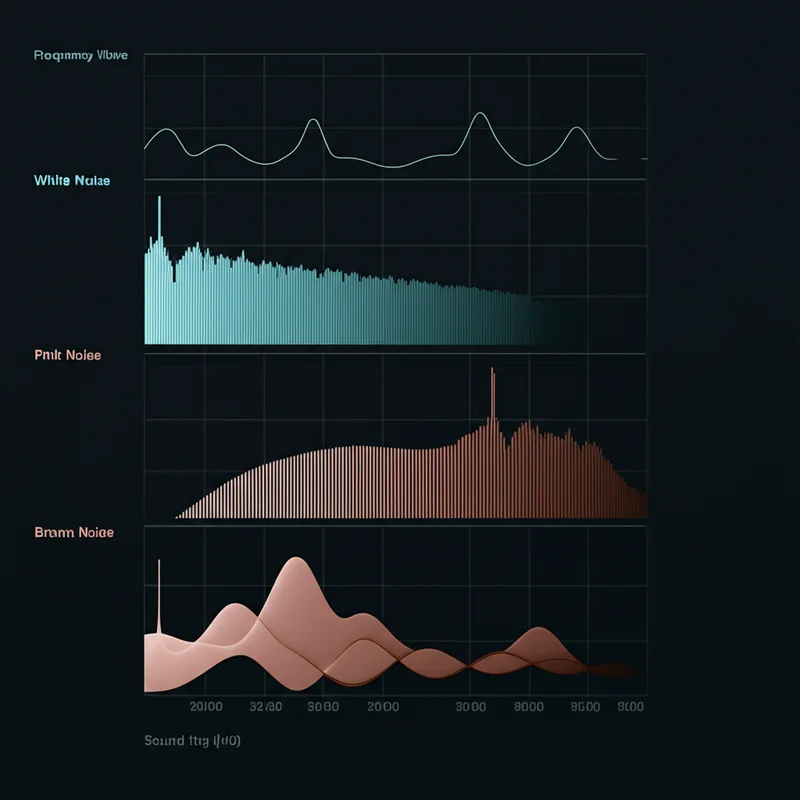
White, pink, and brown noise have different frequency distributions, making each suited to different tinnitus types
Comparison: Best Sounds for Different Work Scenarios
Use this table to quickly find the best background noise for your specific situation:
| Work Scenario | Best Sound Type | Why It Works |
|---|---|---|
| Analytical work (data, spreadsheets) | White noise | Consistent, non-distracting, masks high frequencies |
| Creative work (writing, design) | Pink noise or nature sounds | More pleasant for long sessions, promotes flow state |
| Meetings and calls | Low-volume pink noise | Blends well, easy to talk over, non-intrusive |
| Open office environment | White or pink noise | Blocks unpredictable sounds, creates personal sound space |
| Private office | Any (use speakers) | Full control over environment, experiment freely |
| High-pitched tinnitus | White noise | Contains high frequencies that blend with ringing |
| Mid-range tinnitus | Pink noise | Balanced frequency distribution matches mid tones |
| Low-frequency tinnitus | Brown noise | Deep frequencies mask humming and buzzing |
| Stressful work periods | Nature sounds + pink noise | Calming effect reduces stress-triggered spikes |
How to Choose the Right Sound
Step 1: Identify Your Tinnitus Frequency
Your tinnitus has a characteristic pitch—high, mid, or low frequency. Use a frequency matching tool (like the one in Earpeace) to find your exact frequency. This takes 5-10 minutes and significantly improves masking effectiveness.
Step 2: Match Sound to Frequency
- High-pitched tinnitus (3,000-8,000 Hz): White noise, rainfall, cicadas
- Mid-range tinnitus (1,000-3,000 Hz): Pink noise, wind, ambient soundscapes
- Low-frequency tinnitus (below 1,000 Hz): Brown noise, ocean waves, distant thunder
Step 3: Consider Your Work Task
Different tasks benefit from different sounds:
- Focused analytical work: Choose consistent, non-melodic sounds (white/pink noise)
- Creative work: More varied sounds work well (nature soundscapes, layered sounds)
- Meetings and calls: Keep volume low and choose sounds that blend with conversation
Step 4: Test and Adjust
Try each sound type for at least 20-30 minutes during actual work tasks. Pay attention to:
- How well it reduces tinnitus awareness
- Whether it becomes distracting over time
- Your ability to concentrate on work
- Comfort level during extended listening
Headphone Options for Work
The type of headphones you use significantly impacts tinnitus relief effectiveness and comfort during long work sessions.
| Headphone Type | Best For | Pros | Cons |
|---|---|---|---|
| Bone Conduction | Open offices, meetings, awareness needed | Ears stay open, no occlusion effect, maintain situational awareness | Lower bass response, may need higher volume |
| Open-Ear / Air Conduction | Open offices, collaborative environments | Natural sound, comfortable, hear surroundings | Sound leakage, less effective masking |
| Noise-Canceling (with caution) | Cubicles, noisy environments | Blocks external noise, immersive experience | Can increase tinnitus awareness, use transparency mode |
| Desktop Speakers | Private offices, home office | No headphones needed, most natural, shareable | Requires private space, less precise masking |
⚠️ Important: Avoid Traditional Earbuds for Long Periods
Traditional earbuds that seal the ear canal can create an "occlusion effect"—trapping sound inside the ear, which often makes tinnitus MORE noticeable. If you must use earbuds, limit sessions to 45 minutes with 15-minute breaks, and keep volume low (30-40 dB). Bone conduction or open-ear headphones are much better choices for all-day tinnitus management.
The Work Protocol: How to Use Background Noise Effectively
Follow this step-by-step protocol to maximize tinnitus relief while maintaining productivity:
Step 1: Morning Setup (5 minutes)
- • Open your tinnitus relief app before starting work
- • Select your preferred sound based on today's tasks
- • Set volume to 30-40 dB (quiet conversation level)
- • Test sound with eyes closed—tinnitus should be faintly audible but not intrusive
Step 2: During Work Sessions (45-90 minutes)
- • Use background noise throughout focused work periods
- • Keep volume consistent—avoid the temptation to increase it
- • If using headphones, prefer bone conduction or open-ear types
- • For meetings, either pause or lower volume significantly
Step 3: Regular Breaks (Every 60-90 minutes)
- • Remove headphones if using them
- • Take 5-10 minute break from all sound
- • Stretch, hydrate, rest your ears
- • This prevents ear fatigue and maintains effectiveness
Step 4: End of Workday
- • Stop background noise 30-60 minutes before leaving work
- • Give your brain time to transition to natural silence
- • Note any changes in tinnitus awareness for tracking
- • Use evolution tracking features to monitor progress weekly
Volume Guidelines
Target volume: 30-40 dB SPL (about the level of a quiet conversation)
- • If you cannot hear your tinnitus at all, volume is too high
- • If tinnitus is clearly audible and bothersome, volume is too low
- • Ideal: Tinnitus blends with background sound, noticeable but not intrusive
- • Use your phone's decibel meter app to measure if unsure
Using Earpeace at Work
Earpeace offers several features specifically designed to support tinnitus management during work hours:
Precision Frequency Matching
Use the frequency matching tool to find your exact tinnitus frequency. This allows you to choose sounds that blend optimally with your specific tinnitus pitch, enabling effective relief at lower volumes. Takes 5-10 minutes initially, then your frequency is saved for future sessions.
The Sanctuary: Layered Soundscapes
Create personalized sound combinations by layering nature sounds with white, pink, or brown noise. For work, try combinations like: rain + pink noise for creative tasks, or ocean waves + brown noise for stress reduction. Save your favorites for quick access during busy workdays.
Background Audio
Earpeace's background audio feature lets sounds continue playing even when your phone screen is off or you're using other apps. This is essential for all-day use at work—you can check emails, join video calls, and use productivity apps while maintaining continuous tinnitus relief.
Dark Mode
Long hours in front of screens can cause eye strain. Earpeace's dark mode provides an eye-gentle interface that's comfortable to use during extended work sessions, especially in low-light office environments.
Evolution Tracking
Monitor your progress over time with evolution tracking. Log your daily tinnitus experience, identify patterns (e.g., worse on high-stress days), and see how consistent background noise use correlates with improvement. Weekly check-ins help maintain motivation and guide adjustments.
Guided Breathing
When work stress triggers a tinnitus spike, use the guided breathing exercises for 5-10 minutes. Deep breathing activates the parasympathetic nervous system, reducing stress hormones that can amplify tinnitus. Use during lunch breaks or between high-pressure tasks.
Ready to use Earpeace at work?
Download EarpeaceTips for Different Work Environments
Open Office
- •Use bone conduction or open-ear headphones to maintain awareness of colleagues and conversations
- •White or pink noise works best to mask unpredictable sounds from coworkers
- •Keep volume moderate (35-40 dB) so you can still hear important sounds
- •Use background audio to maintain relief while collaborating or moving around
Cubicle / Semi-Private
- •Bone conduction headphones are ideal—provide relief while staying approachable
- •Noise-canceling headphones with caution: Use transparency mode to avoid isolation
- •Take regular breaks every 45-60 minutes to prevent ear fatigue
- •Avoid earbuds that seal the ear canal—they can worsen tinnitus through occlusion effect
Private Office / Home Office
- •Desktop speakers provide the most natural experience—no headphones needed
- •Full control over volume allows experimentation to find optimal levels
- •Try all sound types freely—this is the best environment for testing what works
- •Use guided breathing during stressful periods without disturbing colleagues

Background noise therapy allows professionals to maintain focus and productivity despite tinnitus
Handling Meetings and Calls
Meetings and calls present unique challenges for tinnitus management. Here's how to handle them effectively:
Before Meetings
- Lower background noise volume to near-minimum
- Switch to pink noise (blends better with conversation than white noise)
- Test that you can hear clearly at your chosen volume
- If using headphones, switch to bone conduction or transparency mode
During Meetings
- Keep background noise playing at very low volume for continuous relief
- Pause background noise during important discussions if needed
- Use desktop speakers instead of headphones when possible
- Take brief listening breaks during long meetings (step away for 2-3 minutes)
Video Calls
- Desktop speakers work best—you can hear both call audio and background noise
- If using headphones, ensure they don't create feedback with your microphone
- Use bone conduction headphones to hear your own voice naturally
- Keep background noise volume low enough that it doesn't transmit through your mic
Pro Tip: Meeting Mode
Create a dedicated "meeting mode" sound profile in your app with low-volume pink noise that's optimized for conversation. This lets you quickly switch between "focus mode" (louder, more masking) and "meeting mode" (quieter, less intrusive) throughout the workday.
Frequently Asked Questions
What is the best background noise for tinnitus at work?
+
Can I use background noise all day at work?
+
Should I use headphones or speakers for tinnitus relief at work?
+
How loud should background noise be for tinnitus masking?
+
What if background noise makes my tinnitus worse?
+
Can I use background noise during meetings and calls?
+
How do I find my tinnitus frequency for better masking?
+
What is the difference between white, pink, and brown noise?
+
Finding Your Best Background Sound
Managing tinnitus at work doesn't have to mean suffering through the day or avoiding quiet moments. With the right background noise—matched to your tinnitus frequency, work environment, and task type—you can maintain focus, reduce stress, and gradually train your brain to habituate to the phantom sounds.
The key principles are simple: match the sound to your tinnitus pitch, keep volume low enough for partial masking,take regular breaks, and choose headphones that don't seal your ears. Whether you prefer the crisp consistency of white noise, the natural balance of pink noise, the deep soothing of brown noise, or the calming effect of nature sounds, there's a solution that fits your work style.
Start by finding your tinnitus frequency with Earpeace's precision matching tool, then experiment with different sounds during your actual work tasks. Track your progress over time, and remember that habituation is a gradual process—consistency matters more than perfection.
Ready to Find Your Sound?
Download Earpeace to access precision frequency matching, layered soundscapes, background audio for all-day use, and evolution tracking to monitor your progress.
Download NowRelated Articles
How to Sleep with Loud Ringing in Ears
7-night sleep protocol for tinnitus relief
Notch Therapy for Tinnitus
Science-based guide to frequency-targeted relief
Sound Therapy for Tinnitus
Comprehensive guide to masking and habituation
How to Find Your Tinnitus Frequency
Step-by-step guide to frequency matching